
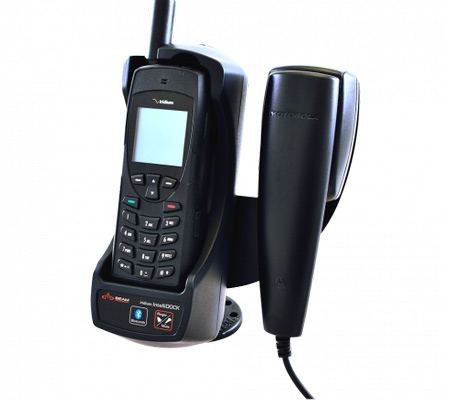
ערכות עגינה לטלפון לוויני
לשימוש בטלפון לוויני בתוך מבנה או רכב
1800
$
כתלות בערכה
A desktop docking kit with an external antenna for a satellite phone allows for convenient and efficient use of the device even inside a building or office. The phone is placed in a stable docking position on the table (including charging and connection to the communication center), while the external antenna is installed outside the window or on a roof and ensures optimal reception. This allows you to make calls, send messages and receive satellite data services continuously, even in areas without cellular coverage. The solution is suitable for remote offices, control rooms, parked vehicles or any place where reliable and convenient communication is required.
עלויות
Estimated costs for installation in a building and vehicle depend on several factors, so please contact us for a personalized quote.
Docking kit model:
- Docking only without any connection
- Docking including electrical connection
- Docking including electrical connection, which is pre-wired and has a connection to a telephone or external telephone (recommended)
The cable and distance to the antenna:
We recommend using the manufacturer's original communication cables - they are more expensive but there is a guarantee for quality and function.
There are cables in lengths between 5 meters and 100 meters - a maximum distance of about 80 meters is recommended between the docking kit and the antenna
As a rule, active antenna cables are cheaper, while passive antenna cables are more expensive
The antenna -
Up to 20-30 meters (depending on the model) a passive antenna can be used
Over 20-30 meters, an active antenna must be used for amplification
Docking kit model:
- Docking only without any connection
- Docking including electrical connection
- Docking including electrical connection, which is pre-wired and has a connection to a telephone or external telephone (recommended)
The cable and distance to the antenna:
We recommend using the manufacturer's original communication cables - they are more expensive but there is a guarantee for quality and function.
There are cables in lengths between 5 meters and 100 meters - a maximum distance of about 80 meters is recommended between the docking kit and the antenna
As a rule, active antenna cables are cheaper, while passive antenna cables are more expensive
The antenna -
Up to 20-30 meters (depending on the model) a passive antenna can be used
Over 20-30 meters, an active antenna must be used for amplification
אודות
Desktop Docking Station:
A desktop docking station is a base unit into which the satellite phone is inserted. It serves as a small communication center and provides:
- Continuous charging – the phone is charged as long as it is docked, so it is always ready for use.
- Voice and data connections – Possibility of connecting to a standard desk phone (via RJ11/POTS), a computer (USB), or a PBX system.
- Built-in speakerphone – Allows convenient use in the office or control room.
- Bluetooth connections – for headphones or car systems.
- SOS options – an emergency button connected to a call center or alarm system.
External antenna:
The external antenna is a critical component that ensures continuous reception in front of the satellites:
- Mounted on a roof, window or vehicle, with a full line of sight to the sky.
- Connected to the cradle via a coaxial cable (usually 5–10 meters, can be extended).
- There are different versions: magnetic car antennas, fixed roof antennas, and dedicated antennas for marine applications.
- Provides stable reception even inside closed buildings or in areas with obstructions.
Main uses
- Remote offices – allow continuous work even without cellular infrastructure or internet.
- Control rooms and command and control centers - permanent connection to emergency, command and control centers.
- Vehicles and off-road vehicles - use of the satellite phone while traveling, with an external antenna on the roof.
- Ships and yachts - stable communication at sea, with a dedicated marine antenna.
- Emergency and backup systems - a reliable solution when cellular or Internet networks collapse.
Advantages:
- Convenient use of the satellite phone like a regular desk phone.
- Continuous reception thanks to an external antenna.
- Integration with existing systems (telephony, computing, control).
- High reliability - a solution for routine and emergencies.
In conclusion: A desktop docking kit with an external antenna turns the satellite phone from a mobile device into a permanent, reliable and convenient communication service, suitable for use in offices, vehicles, ships and emergency centers.
A desktop docking station is a base unit into which the satellite phone is inserted. It serves as a small communication center and provides:
- Continuous charging – the phone is charged as long as it is docked, so it is always ready for use.
- Voice and data connections – Possibility of connecting to a standard desk phone (via RJ11/POTS), a computer (USB), or a PBX system.
- Built-in speakerphone – Allows convenient use in the office or control room.
- Bluetooth connections – for headphones or car systems.
- SOS options – an emergency button connected to a call center or alarm system.
External antenna:
The external antenna is a critical component that ensures continuous reception in front of the satellites:
- Mounted on a roof, window or vehicle, with a full line of sight to the sky.
- Connected to the cradle via a coaxial cable (usually 5–10 meters, can be extended).
- There are different versions: magnetic car antennas, fixed roof antennas, and dedicated antennas for marine applications.
- Provides stable reception even inside closed buildings or in areas with obstructions.
Main uses
- Remote offices – allow continuous work even without cellular infrastructure or internet.
- Control rooms and command and control centers - permanent connection to emergency, command and control centers.
- Vehicles and off-road vehicles - use of the satellite phone while traveling, with an external antenna on the roof.
- Ships and yachts - stable communication at sea, with a dedicated marine antenna.
- Emergency and backup systems - a reliable solution when cellular or Internet networks collapse.
Advantages:
- Convenient use of the satellite phone like a regular desk phone.
- Continuous reception thanks to an external antenna.
- Integration with existing systems (telephony, computing, control).
- High reliability - a solution for routine and emergencies.
In conclusion: A desktop docking kit with an external antenna turns the satellite phone from a mobile device into a permanent, reliable and convenient communication service, suitable for use in offices, vehicles, ships and emergency centers.
מפרט טכני
BEAM's Iridium and Inmarsat desktop docking kits and external antennas are designed to expand the capabilities of satellite phones, making them a permanent and convenient solution for use in the office, vehicle or remote site.
Operating principle
Desktop docking station:
The satellite phone is inserted into a dedicated cradle that provides continuous charging, data connections and the ability to use in hands-free mode or with a regular desk phone.
External antenna:
Connects to the dock via coaxial cable and is installed outside the building or on a roof/vehicle. The antenna ensures optimal reception with Iridium or Inmarsat satellites even when the phone is inside an enclosed building.
BEAM Iridium kits
- Full support for voice, SMS and data services (SBD).
- USB and RJ11/POTS connections allow the use of regular desk phones or integration with PBXs.
- Bluetooth for wireless connection to headphones or car systems.
- Integrated GPS with option to connect an external GPS antenna.
- SOS options and connection to emergency systems.
- Common models: LiteDOCK, PotsDOCK, DriveDOCK Extreme – adapted for desktop, mobile or vehicle use.
BEAM kits for Inmarsat (Inmarsat – IsatPhone 2)
- IsatDock2 PRO / DRIVE:
- Designed for permanent use in the office, vehicle or ship.
- Supports voice calls via built-in speakerphone, standard desk phone or private headset.
- RJ11/POTS for integration with existing telephony systems.
- Bluetooth for wireless connection.
- **Tracking and GPS option** with external antenna.
- External USB and I/O connections for management and control.
External antennas
- Iridium antennas:
Operate in the 1616–1626.5 MHz range, require full line of sight to the sky. There are magnetic antennas for cars, fixed antennas for the roof and antennas dedicated to marine applications.
- Inmarsat antennas:
Adapted to IsatPhone 2, provide stable reception even in difficult terrain conditions.
Installation:
Care must be taken to route RF cables correctly, prevent friction and maintain moisture tightness (IP66/IP67 depending on the model). BEAM guides emphasize that the antenna is the "real connection to the satellite" and therefore it should be placed in a place with full visibility of the sky.
Operating principle
Desktop docking station:
The satellite phone is inserted into a dedicated cradle that provides continuous charging, data connections and the ability to use in hands-free mode or with a regular desk phone.
External antenna:
Connects to the dock via coaxial cable and is installed outside the building or on a roof/vehicle. The antenna ensures optimal reception with Iridium or Inmarsat satellites even when the phone is inside an enclosed building.
BEAM Iridium kits
- Full support for voice, SMS and data services (SBD).
- USB and RJ11/POTS connections allow the use of regular desk phones or integration with PBXs.
- Bluetooth for wireless connection to headphones or car systems.
- Integrated GPS with option to connect an external GPS antenna.
- SOS options and connection to emergency systems.
- Common models: LiteDOCK, PotsDOCK, DriveDOCK Extreme – adapted for desktop, mobile or vehicle use.
BEAM kits for Inmarsat (Inmarsat – IsatPhone 2)
- IsatDock2 PRO / DRIVE:
- Designed for permanent use in the office, vehicle or ship.
- Supports voice calls via built-in speakerphone, standard desk phone or private headset.
- RJ11/POTS for integration with existing telephony systems.
- Bluetooth for wireless connection.
- **Tracking and GPS option** with external antenna.
- External USB and I/O connections for management and control.
External antennas
- Iridium antennas:
Operate in the 1616–1626.5 MHz range, require full line of sight to the sky. There are magnetic antennas for cars, fixed antennas for the roof and antennas dedicated to marine applications.
- Inmarsat antennas:
Adapted to IsatPhone 2, provide stable reception even in difficult terrain conditions.
Installation:
Care must be taken to route RF cables correctly, prevent friction and maintain moisture tightness (IP66/IP67 depending on the model). BEAM guides emphasize that the antenna is the "real connection to the satellite" and therefore it should be placed in a place with full visibility of the sky.
קבוצת תמיכה בווטסאפ
Do you have any more questions?
Leave your details and we will get back to you as soon as possible.